From the finest inkjet greeting cards and accessories to expert printing help, Red River Paper is here for you and we're ready to help!
Welcome to the Greeting Card Help & FAQ. You'll find an answer to the most common questions and in-depth support from design to print and display. If we missed something, don't hesitate to contact us and ask.

Card Setup & Printing Tutorials
Learn how to setup and print cards using Photoshop, Lightroom, and more.
Templates for Photoshop & Lightroom
Download greeting card templates for Adobe Photoshop, Photoshop Elements, and Lightroom.
Greeting Card FAQs
What does "pre-scored" mean?
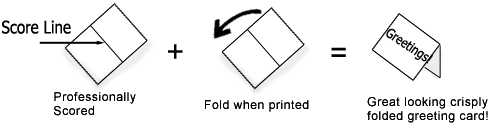
Scoring is an indention on the paper that helps it fold easily. Red River Paper mechanically scores each sheet so it will fold cleanly with no cracking.
How it works...
Can I Try a Sample?
Of course, our Inkjet Greeting Card Sample Kit is one of our most popular sample kits.
What sizes can I choose from?
| Card Size | Unfolded | Printable Area |
|---|---|---|
| 5" x 7" Typical store bought card size | 7" x 10" | 4.75" x 6.75" |
| 4.5" x 6.25" | 6.25" x 9" | 4.25" x 6" |
| 5.5" x 4.25" "Thank You" card size | 5.5 x 8.5" | 5.25" x 4" |
| 5.25" x 5.25" Square card | 5.5" x 10.5" | 5" x 5" |
| 5.5" x 8.5" Big card, sometimes used for invitations | 8.5" x 11" | 8.25" x 5.25" |
| 4" x 9" Pano Card. Perfect for landscapes and panoramas | 8" x 9" | 3.75" x 8.75" |
How do I learn how to print custom cards?
It's pretty simple to set up and print a custom card using Red River Paper cards. An important part of the process is your software. We recommend Photoshop or Photo Elements as they offer the most creative and layout capability. Written and video help for Photoshop, Photo Elements, and other software is available.
Our 8 Tips for Printing Inkjet Greeting Cards is also a good start to successful greeting card printing
What if I'm having problems printing greeting cards?
The number one source of printing problems is an incorrect custom paper size. Review our card setup and printing tutorials carefully and spend time to make certain you set up the custom paper size
according to the instructions. Getting that part wrong will ensure your card will not print correctly.
Other troubleshooting resources:
Will my inkjet printer print on your papers?
All Canon and Epson printers will be able to use our special pre-scored sizes. Some HP printers do not have the ability to set up a custom paper size, which is necessary. Check your manual for more info on custom size setup.
Also, check out this article on Recommended Inkjet Greeting Cards for Front Feed Inkjet Printers.
Finally,some inkjet printers only feed paper from a front cassette. This includes all HP printers and some Epson and Canon models. If this describes your printer, find recommended greeting cards for front feed only inkjet printer models.
Do you offer matching envelopes with the papers?
Red River Paper carries a complete selection of matching envelopes for your cards. Several styles, colors and sizes are available. Please note that envelopes do not come pre-packaged with your cards. You will also see links to order the envelopes of your choosing throughout our site.
What inkjet printers are best for printing greeting cards?
We have a great article on choosing the best printers for greeting card printing in our Information Center.
How much do cards cost to print?
We’re glad you asked because the answer will surprise and delight. Including paper, ink, and envelope, most cards cost you less than $1.00 each! That is an amazing value considering your cards will be custom, professional quality, and made exactly when you need them. Compared to mass produced greetings cards at $4.00 each, you cannot go wrong printing your own cards today.
We've got a complete list of cost estimates for printing our cards on YOUR printer.
How do I fold my cards? What side do I print on?
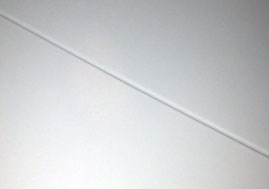
Indented - Outside of Card
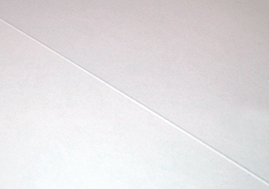
The Raised Side - Inside of Card
Red River Paper's pre-scored note card stock is packed print side up in the box.
How-to fold greeting cards video available here.
- For Single-sided Cards - packed print side up in the box.
- For Double-sided Cards - packed with the outside of the card facing up in the box
You'll notice that the score line has two distinct sides - an indented side and a raised side. Fold away from the indented side of any scored card.
You should print AND THEN fold. We also recommend that you allow sufficient time for the ink to dry before folding. Wearing white cotten or similar gloves is also recommend to avoid leaving finger prints and smudges.
Single-Sided vs. Double-Sided Cards Explained
Definitions:
Single-sided = Paper coated on ONE SIDE for photo or art quality printing.
Double-sided = Paper coated on BOTH SIDES for photo or art quality printing.
Why buy one vs. the other?
Purchase single-sided cards when you intend to print photos or artwork on the outside of your card. Also, if you intend to write with pen or ink on the inside of your card, a single-sided paper will perform best. You can write on the coated side of paper, but you will often experience pens being clogged by inkjet coating.
Purchase double-sided cards when you intend to print photo or art quality on the inside AND outside of your greeting card.
What are "Square Cards"?
The square note card size offers a unique way to share and display your photos and artwork. Find out more Square Inkjet Printable Greeting & Note Cards.
Do you recommend any specific software for greeting card printing?
What about custom tips for Mac's?
See our Custom Tips for Mac.
Why don't you have any satin or luster greeting card stock?
In order to be a viable inkjet greeting card, the back of the paper must be plain paper or coated for printing. All satin and luster papers at this point at "resin coated", which means they have a plastic backing. The paper is hard to score and fold. You cannot print on the back and writing is difficult. Red River Paper continues to search for a paper that meets these criteria.
Will these papers work with pigment inks?
Yes. All of our greeting card papers are compatible with pigment as well as dye inkjet ink.
Can I print borderless greeting card sizes?
For most, the answer is no. Borderless sizes are preset by the printer manufacturer. They include "standard" photo sizes like 4x6 and 8x10. Red River Paper's cards, though industry standard sizes, are not acknowledged by Epson, Canon, or HP. As a result, your cards will have a minimum 1/8" border on all sides.
However, several Canon models can print on the 7x10 (A7) size without borders. These include the PRO-300, PRO-300, and most TS/TR series models.
I am getting black marks and ink streaks on cards.
This is usually because your paper curls up slightly under the ink load.
- Check to see which part of your card comes of of the printer last.
- If the photo side of your card comes out last - Rotate your card layout in 180 degrees so that the photo side comes out first.
- If the photo side comes our first and you still have issues - Give the paper a slight downward curl (away from the print side) just before printing.
We also have a video covering tips for solving this problem.
In most cases, cards print so that the photo comes out last. Rotate your card canvas so that the photo prints first. The end of the print will be the back of the card with minimal ink and therefor minimal ink absorption and minimal upward curl.
I have a Epson / Canon / HP wide format printer. Can I use your cards?
Wide format printers - 24" and wider - are usually limited to 8x10 sheets and larger. Most greeting card sizes are not compatible. You can use our 8.5" x 11" scored sheets.
Pano Card FAQs
What sort of image works for this size?
You might be surprised, but many photos you take hold interesting landscape or vertical crops if you experiment a bit.
Can I use these cards with my printer?
Yes. Pano cards work exceptionally well in Epson and Canon inkjet printers.
What is the maximum image size I can fit on the Pano Card?
Landscape orientation - 8.75" wide and 3.75" tall
Portrait orientation - 3.75 " wide and 8.75" tall
Depending on your printer and operating system, this size may be smaller. Borderless printing is not available on custom paper sizes.
How do I feed the Pano Card into my printer?
As with any size, you should feed the shorter side in first. With the Pano Card, the score line will run vertically, or along the paper feed path.
What envelope do I use?
The Pano Cards use a standard #10 business envelope. You can order them here. Red River envelopes are made from high quality 28lb. paper as opposed to standard 20lb. paper used in most envelopes.
How do I prepare an image for the Pano Card?
In Photoshop, access the crop tool by pressing C on your keyboard. The function menu (seen below) will appear along the top of your workspace:

Set the size of your crop in the Width and Height boxes. In the resolution box, leaving this space blank means your image will be resized but not resampled. In short, this means the resolution (ppi) of your photo will change. To keep it fixed, set the resolution to 300, which is suitable for print quality.
Some Examples.




Related Posts and Information
Last updated: September 11, 2024


