How to create user defined paper sizes - Epson and Photoshop CS3 CS4
For Red River Paper greeting cards, scrapbook 12x12 sheets, panorama printing, and other special projects, you need to define a custom paper size in the Epson printer properties. Below are instructions for setting a custom paper size starting in Photoshop 7, CS, CS2.
For Red River Paper greeting cards, scrapbook 12x12 sheets, panorama printing, and other special projects, you need to define a custom paper size in the Epson printer properties. Below are instructions for setting a custom paper size starting in Photoshop CS3 and CS4.
In Photoshop click PRINT then PAGE SETUP from the print preview menu.
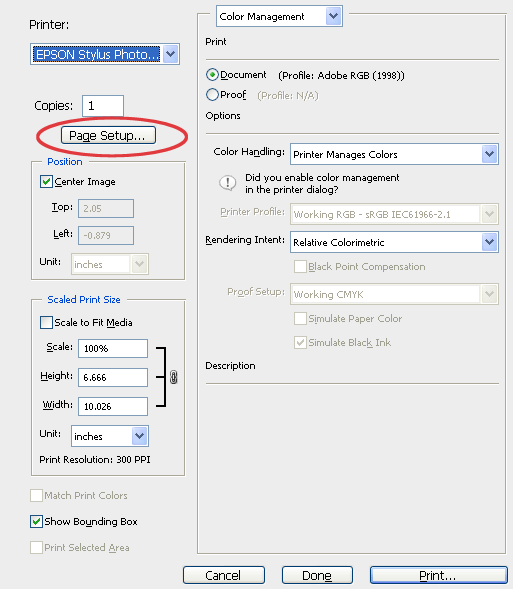
New Epson printer driver versions
On the Main tab of the printer's properties, locate and click the "User Defined..." button.
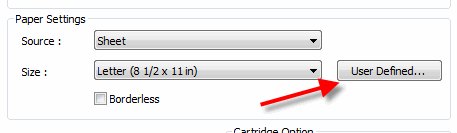
This brings up the User Defined Paper Size dialog.
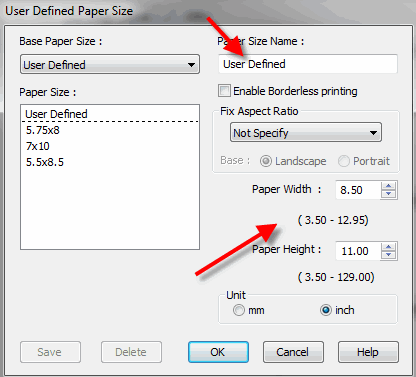
Name your new paper size something easy to understand. Enter it in the dialog at the top of the menu.
Enter the paper's width and height.
SPECIAL NOTE:
When defining width and height, ALWAYS set your smaller sheet dimension to width and larger to height.
Example - on a 7x10 greeting card 7 is the width and 10 the height regardless of the print orientation.
When you are done click OK.
The custom size will now be available for your use in the paper size drop down menu.
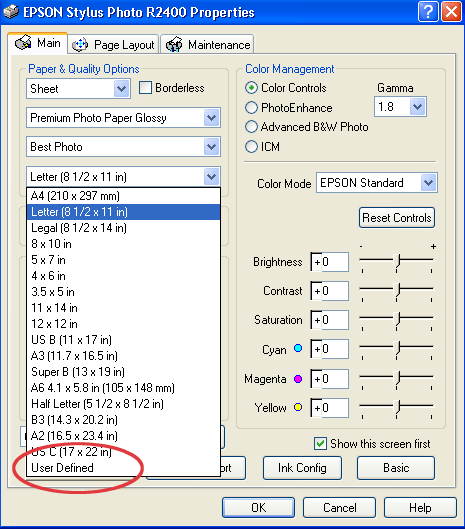
Older Epson printer driver versions
From the media size drop menu choose USER DEFINED.
Name your new paper size something easy to understand. Enter it in the dialog at the top of the menu.
Enter the paper's width and height.
SPECIAL NOTE:
When defining width and height, ALWAYS set your smaller sheet dimension to width and larger to height.
Example - on a 7x10 greeting card 7" is the width and 10" the height regardless of the print orientation.
Set your paper width and height. Notice how Epson defines the dimensions - the numbers are .01 inches. So for a 7x10 card you would assign width as 700 and height as 1000.
When you are done click OK.
The custom size will now be available for your use in the paper size drop down menu.
Note for 13x38 panorama users - the max paper width will be set to 1295.
Related Posts and Information
Last updated: December 07, 2020


