How to create user defined paper sizes - HP and Photoshop CS5 / CS6 / CC
For Red River Paper greeting cards, scrapbook 12x12 sheets, panorama printing, and other special projects, you need to define a custom paper size in the HP printer properties. Below are instructions for setting a custom paper size starting in Photoshop.
Shop for the Best Compatible HP Photo Papers.
To Begin:
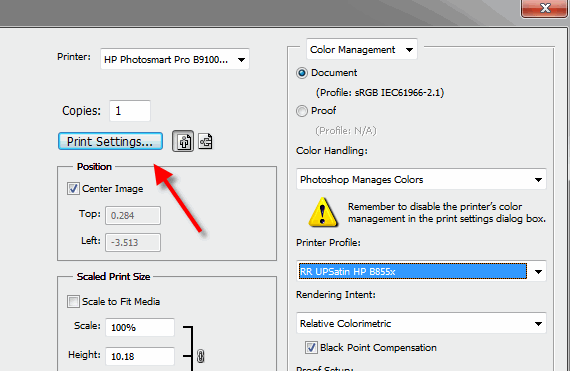
In Photoshop click PRINT. Choose your printer from the Printer drop down menu.
Now click the Print Settings button. This will launch your printer's property dialog.
In the printer properties, click on the Features tab.
Under the Paper Size Options, choose Custom
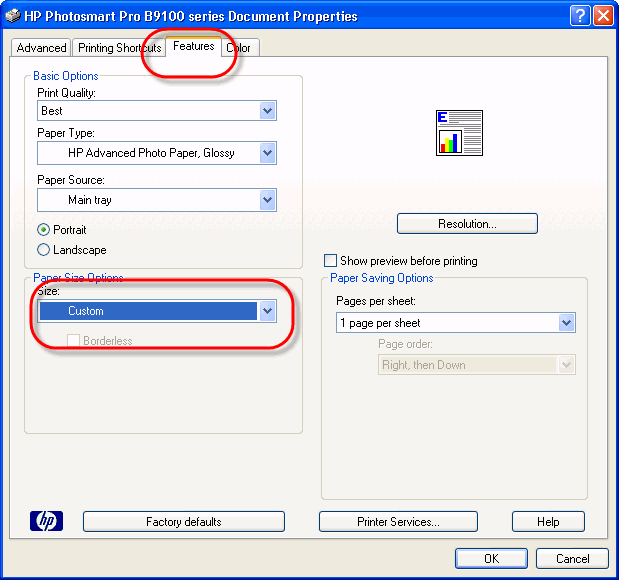
In the printer properties, click on the Features tab.
Under the Paper Size Options, choose Custom.
If you do not see a Custom option in the Size drop down menu, your printer's driver does not support custom sizes. For some reason as yet unknown, HP removed this feature from many printers starting in 2013. See a Potential Fix to Correct a Custom Size Option.
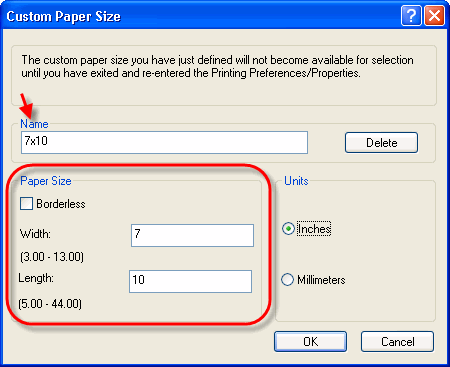
Set the width and height of your custom paper size. Name the size and click OK. It will be available in the Paper Size listing above for future print jobs.
* Important Tip - the smaller paper dimension is ALWAYS the width. The larger dimension is always the height.
Last updated: April 25, 2022


