A guide to using ICC printer profiles with older Canon imagePROGRAF inkjet printers in Photoshop. These screenshots cover the printing setup, not soft proofing.
In Photoshop click File > Print and you will see the new print with preview page.
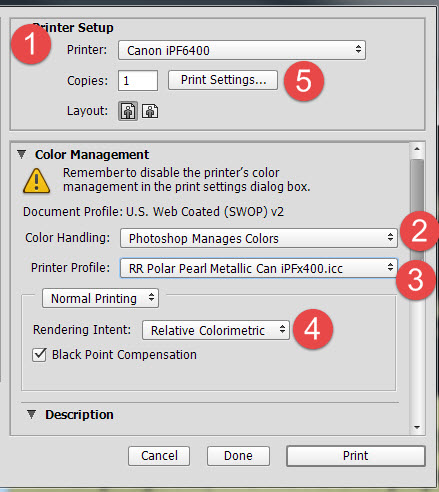 |
1) Verify your printer is selected 1) Set "Photoshop Manages Color" 3) Select your paper profile here 4) Select Relative Colorimetric or Perceptual. Check Black point Compensation 5) Click Print Settings
|
When you click Print Settings the printer properties appear. (Scroll down for older Prograf printer menus)
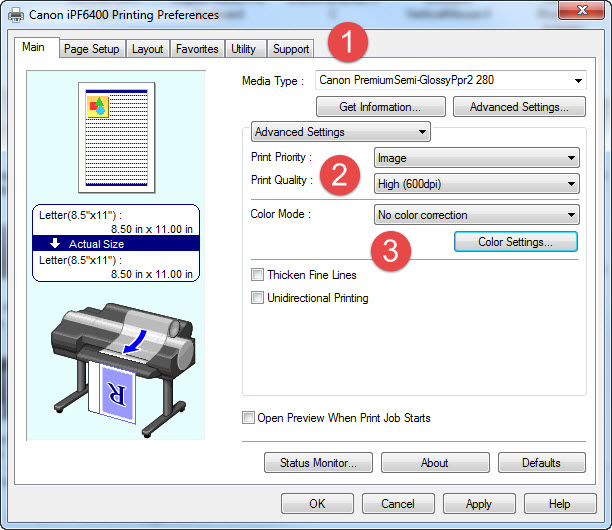 |
1) Set media type - look in profile instructions for proper setting 2) Set quality 3) Set Color Mode to "No color correction" Click OK to return to Photoshop |
Older Prograf printing preferences
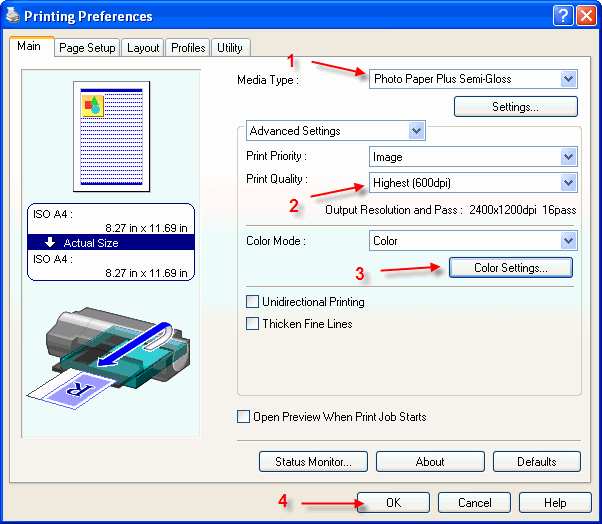 |
1) Set media type - look in profile instructions for proper setting 2) Set quality 3) Click Color Settings When you are done with the color settings step below, click OK to return to Photoshop |
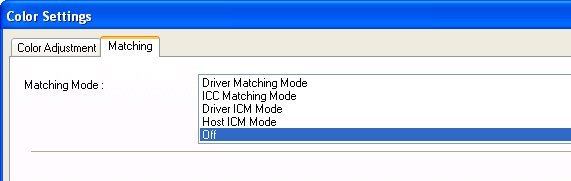
The Color Settings menu - set Matching Mode to OFF and click OK
Last updated: August 30, 2019


