Meet the Satins
Three unique satin papers to make superb prints and save you money
Satin Surface Primer
Whether called Satin, Luster, Pearl, or Silk, these names almost always refer to an E-Surface finish. Just look to the nearest photo lab print and you will most likely see this pebbled finish.

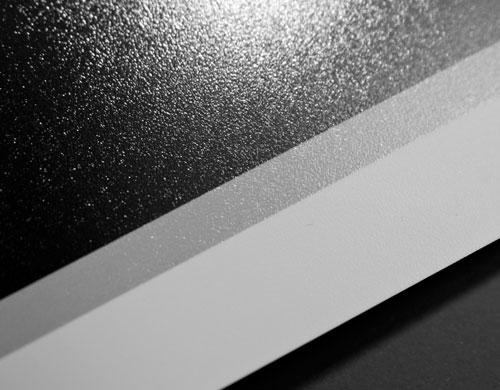
The DEPTH of this surface varies from paper to paper. The more shallow the depth the less you will notice the surface on a printed image. See depth chart:
The TONALITY of the paper is also an important factor. Arctic Polar papers feature a cool, crisp white surface shade while UltraPro Satin has a slightly warm white tonality. The best part is you get to choose based on your personal needs. |

Shop the Satins
Arctic Polar Satin™
| Arctic Polar sets the bar for top quality microporous media. Imported specially for Red River Paper, Arctic Polar is the brand to buy when you absolutely have to have the best. Arctic Satin features a low-depth luster finish perfect for photos where glossy reflections are not wanted. Most photo lab prints are done on this type of surface. |
- Satin Texture: Shallow
- Paper Tone: Bold Bright White
- Paper Weight: 66lb (266gsm)
- Thickness: 10.4mil
- 8.5x11 Pricing: As low as 43 cents/sheet
|
Order a Box of Arctic Polar Satin - Order now
UltraPro Satin™
| UltraPro will capture the true depth and range of colors in your photography, and lets your inkjet printer perform to its maximum potential. UltraPro Satin 2.0 looks and feels just like traditional photo lab paper and features a medium depth luster finish. |
- Satin Texture: Medium
- Paper Tone: Pleasing slightly warm white
- Paper Weight: 68lb (270gsm)
- Thickness: 10.4mil
- 8.5x11 Pricing: As low as 27 cents/sheet
|
Order a Box of UltraPro Satin- Order now
Arctic Polar Luster™
| Arctic Polar Luster is the paper pros demand and enthusiasts deserve. This is the height of modern photographic look and feel. Extra weight and profoundly beautiful surface will make your photography look its best. |
- Satin Texture: Deep
- Paper Tone: Bold Bright White
- Paper Weight: 75lb (300gsm)
- Thickness: 11.8mil
- 8.5x11 Pricing: As low as 83 cents/sheet
|
Order a Box of Arctic Polar Luster - Order now
|
Using ICC Profiles with Photoshop Elements 8 Mac
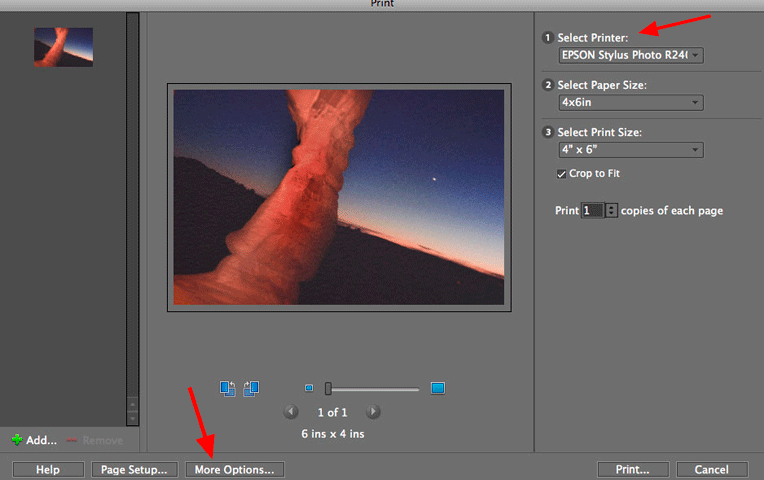
Here's a quick guide to using ICC profiles in Photoshop Elements 8 with a Mac (PC lesson here).
You'll notice a different look to the menus, as the ICC profile selection menu is basically hidden until you seek it out.
Read the tutorial, which covers Epson, Canon, and HP printer settings here.
How to Prevent Out-Gassing "Ghosting" of Framed Inkjet Prints
You can prevent "gas ghosting" - the light haze that can occur when you frame an inkjet print under glass - by following these steps.
1. After printing, allow your print to rest in the open for 15 minutes
2. Now, lay a piece of plain copy paper on top of your print for 24 hours. The plain paper will absorb the ink solvents and speed up the drying process
|
 |
3. After a full 24 hours check the plain paper to see if it look wavy. If so, it means the paper is still absorbing ink solvents. Place another sheet of plain paper on top of your print and wait another 24 hours.
If the plain paper is flat, and not wavy, then your print is ready to be framed.
If you find a framed image with a light haze on the inside of the glass, then your print is still out-gassing. Remove the print, do the above steps, clean the glass, and reframe the print.
|