With so many inkjet printers available, your choices for the best greeting card printer are better than ever. But, for the serious amateur or pro photographer with print production in mind, the field of good printers narrows considerably. Based on our experience, several key factors come together to make reliable, high-quality greeting card printers. Most manufacturers have at least one printer that fits the bill for the best printer for card making. The printers in this article have been selected based on hours of printing experience in the Red River Paper print labs.
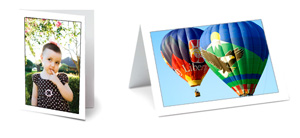
Shop for Inkjet Greeting Cards
Learn About Cost of Printing
Best Printers for Card Making
- Canon Pro-200S
- Canon G620
- Canon TS Series
- Epson ET-8500 ET-8550
What We Looked for in the Best Greeting Card Printers
- Reliable paper feed - greeting card papers require a printer with a well designed, reliable paper feed.
- Speed - you don't want to wait around all day for a run of 100 cards
- Color and detail - most greeting cards feature photos or artwork that need true color reproduction
- Product quality - how long will the printer run before you have to buy another?
- Ink economy - you need to keep overall costs down to maximize profit and minimize overhead.
1. Canon PRO-200S
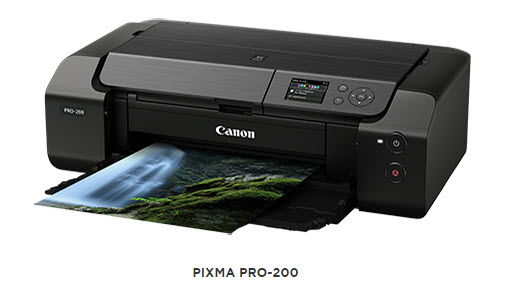
Street Price: $599
Shop for the Canon PRO-200S on Amazon
The replacement for the top-selling Canon PRO-200, the PRO-200S, is another "hot rod of greeting card printers". Excellent color reproduction, robust paper transport mechanism, and compatibility with all Red River inkjet papers make these printers suitable for greeting card production. This printer is also an excellent choice for those looking to expand into larger print sizes.
All Red River Paper greeting and note cards are compatible with the Canon Pixma PRO-200S.
For more information, read the Canon PRO-200S Insiders Guide
Pros
- BORDERLESS 7x10 (folds to 5x7) capability
- Speed - outstanding speed even at top quality level
- 8 color dye inks - outstanding color
- Compatibility - works with almost all Red River inkjet papers
- Paper feed - consistent feeding of all Red River stocks
Cons
- Effectively none
2. Canon G620
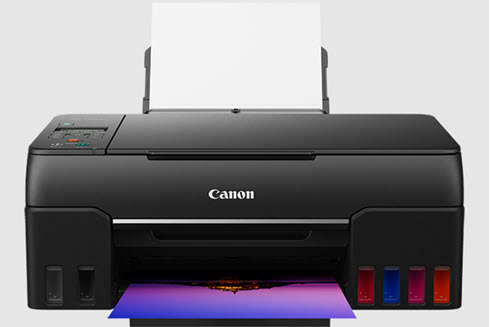
Street Price: $329
Shop for the Canon G620 on Amazon
A MegaTank printer with excellent photo quality! Many tank printers (they use large ink reservoirs instead of ink cartridges) are best suited for office and basic photo printing. However, the G620 performs so well for photos and artwork that it makes our list. The big news is that the cost of printing is much lower than cartridge printers which makes the G620 a great option for those in search of the best printer for printing greeting cards at home.
Pros
- BORDERLESS 7x10 (folds to 5x7) capability
- Speed - You can expect excellent speed with design and photo prints
- Good color quality
- Reliable paper feed system
- Connectivity - USB 2.0, ethernet, wireless
- Six color - CMYK + Red + Gray
Cons
- No Mac OS driver. You will print via the Airprint driver. This means you cannot use printer profiles. You will let the printer manage colors.
3. Canon TS9521Ca + Other TS Series Printers
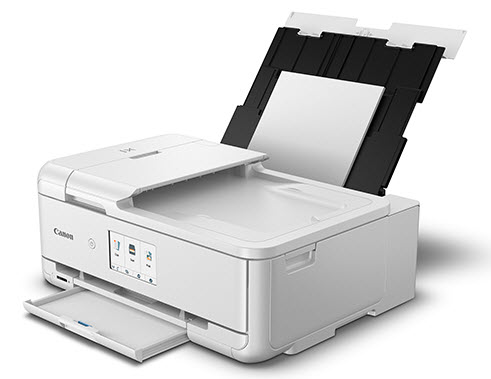
Street Price: $299
Shop for the Canon TS9521Ca on Amazon
It features four dye-based photo inks and one pigment black for document printing. It can also print 12x12 sheets without borders. Red River Paper Supports all TS Models with Printer Color Profiles.
Pros
- Speed - You can expect excellent speed with design and photo prints
- Good color quality - recommended that you use ICC profiles for the best possible output
- Very reliable paper feed system
- Connectivity - USB 2.0, Ethernet, wireless
- Four color - four dye-based ink tanks plus pigment black for documents
Cons
- 5 color system - Canon has discontinued low cost six color printers.
- Smaller ink tanks mean more replacements. Please note ink cost still in line with our estimates.
4. Epson ET-8500 ET-8550
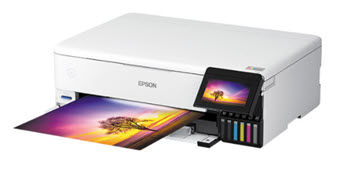
Street Price: $699-$799
Shop for the Epson ET-8550 on Amazon
Epson printers rarely make it on this list. The reason is paper feed capability. Everything about Epson's products, except for the paper feed, is usually excellent. If you're trying to print greeting cards, they can be trouble. The Epson ET-8500 and ET-8550 are exceptions. We find the paper feed system to be better than usual. They are not Canon-level quality, but they are acceptable. If you are an "Epson person", here's your chance to buy your favorite brand for greeting and note card projects.
Most EcoTank printers are best suited for office work and are difficult to color manage. Not the ET-8500 and ET-8550! Epson took the stellar Claria dye ink system and converted it to the EcoTank format. This means excellent print quality and low printing cost. Red River Paper supports these printers with ICC color profiles as well.
DO NOT USE WITH PECOS RIVER GLOSS CARDS - These printers damage the surface of Pecos during the feed cycle.
DO NOT USE WITH COTTON PAPERS OVER 250gsm - The feed system cannot handle thick fine art paper through the top tray.
Pros
- Speed - You can expect excellent speed with design and photo prints
- Good color quality - recommended that you use ICC profiles for the best possible output
- Good paper feed system for 180-250gsm weight card stocks
- Connectivity - USB 2.0, ethernet, wireless
- Six color
Cons
- High initial cost
- Paper feed system is good but not great. Do not be surprised if you have misfeeds from time to time.
Why Not Include an HP Greeting or Birthday Card Printer in the List?
HP makes fine photo printers but the paper feed system does not support cardstock paper or any paper over 11 mil thickness which is crucial for any photo card printer. Additionally, HP has removed the custom paper size feature from the Windows driver. This locks Windows users from popular greeting card sizes. If you have an HP and have successfully printed on Red River Paper greeting cards, we would love to hear from you via our Support Center.
Summary
Paper feed, print speed, and print quality are all top considerations when picking a printer for cards. Always pick printer with a top loading paper tray. Do not choose a printer that only loads from a front paper cassette. It won't work for card stock.
A popular question is "How much will it cost to print my cards?". After extensive printing and calculations on ink usage, Red River Paper produced a Cost Per Card Chart. The great news is that paper, ink, and envelope cost less than $1.00 for most papers.
Printing inkjet greeting cards is a big part of what makes inkjet printers especially useful. Red River Paper feels that photographers and artists should create a line of cards from their work. At minimum they are powerful marketing pieces. They can often be sold for $5 each at art fairs or festivals.
WHAT'S NEXT
Red River Paper is the Definitive Source of Inkjet Greeting Cards
Ink, paper, and envelope cost less than $1.00 per card. What a deal! Red River Paper sells the best inkjet stock pre-cut and scored ready to use for card printing.
Try Before You Buy
Order a Greeting Card Sampler today and find your favorites
Learn About the Cost to Print Your own Cards
Related Posts and Information
Last updated: October 06, 2025


