This report addresses concerns and arguments about the true cost of ink in desktop photo printing. Using the Canon Pro 9000 and Pro 9500, we conducted a series of print tests to determine how much ink is used in a full coverage 8”x10” print. From that figure we extrapolated ink usage per square inch. The objective is to share a realistic cost per print vision with inkjet users. The choice to pursue photo inkjet printing is in the end an individual economic choice.
Cost of Printing Per Page Chart
| Printer | 4x6 | 5x7 | 8x10 | 11x14 | 13x19 |
|---|---|---|---|---|---|
| Pro 9000 | $0.22 | $0.34 | $0.72 | $1.40 | $2.25 |
| Pro 9500 PK | $0.24 | $0.32 | $0.82 | $1.58 | $2.54 |
Our calculations are based on the current Red River Paper price for R2400 and R1900 inks. PRO 9000: $13.90. 9500: $13.75. If you pay more or less for inks, just use the above equation, and substitute your cost.
Testing Methods
Preface
The "true cost of inkjet printing" is a source of constant debate in the media and on web forums. With claims of ink costing five to ten thousand dollars per gallon, it’s not a mystery why the debate continues. Still, inkjet printer sales and printing continue to increase and studies indicate this trend will continue in the short and mid-term. Do the majority of end users simply not care about the cost, or do they know something that is missing from the discussion? This report looks at the cost of ink per square inch for two Canon desktop printers. The goal is to determine the cost for various popular print sizes, and to report those numbers. Further, we hope to spark more discussion and debate about the merits of inkjet printing in light of its unique ability to offer on-demand continuous tone photo reproductions that will last many decades.
Methodology
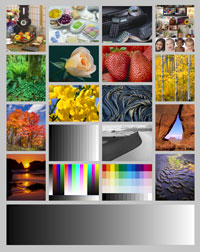
Two hundred 8x10 prints of Bill Atkinson’s printer test were made. The montage of photos in Atkinson’s image provided near 100% coverage, used a wide variety of colors, and presented what amounts to a worst-case scenario of ink usage. A pre-primed printer was loaded with new and previously unopened ink cartridges. The image was resized to 8" x 10" at 300ppi.
Prints were made using the High Quality setting within a color- managed workflow. Inks were changed only when the printer stopped and indicated an empty tank. At the 200th print, a count was made of ink cartridges used plus an estimate of remaining ink cartridges. From that information, total use of ink in equivalent number of ink cartridges used was obtained. The ink usage was equated to amount per square inch and then converted to specific photo sizes.
Ink cartridge use calculations
New cartridges were installed at the beginning of the test. At the end of printing:
- Number of cartridges replaced (including the starting cartridge) was tallied
- Remaining cartridges were evaluated for amount remaining and thus volume used
For final ink estimates, a screen capture was made of the Canon Status Monitor, which shows a display of ink cartridge status. From the screen grab, a graph breaking the ink level into 10% increments was used to make an estimate of ink remaining. It was assumed that the Status Monitor display offered an acceptably accurate account of how much ink was in the cartridges. From previous experience we observed the printer quitting immediately or just after a cartridge displayed "dry". That proved helpful in making estimates of ink left per cartridge. (See end section for all screen grabs)
For the purpose of this experiment, the question of how much ink is left in an "empty cartridge" is moot. If the printer quits then effectively the cartridge has run dry. The final results focus on actual yields, not questions of lost milliliters in spent cartridges.
Cartridge Equivalent Usage
In order to quantify the total amount of ink used for 200 prints, the number of tanks replaced must be added to the amount of ink remaining in the printer. To describe that number, we created the Cartridge Equivalent Usage measure (herein CEU).
To depict the ink used in the remaining cartridges, a chart was created using the graph mentioned above. From that graph the amount of ink used in each remaining cartridge was recorded in percent terms. The percentage for each tank was added, then divided by 100 to provide the CEU of the remaining ink cartridges.
Cartridge Equivalent Usage has two parts:
- The number of tanks used and replaced
- The amount of ink left in the remaining tanks
The CEU of the remaining tanks was added to the number of cartridges physically changed. This number was the total CEU for the 200 prints. Dividing the total CEU by 200 gave the CEU per 8” x 10” print.
Equation for CEU
Sum of the % used for remaining tanks / 100 = CEU of remaining tanks
CEU remaining + Cartridges changed / 200 = CEU of 8x10 print
CEU of 8x10 print / 80 square inches = CEU per Square Inch
Cartridge Use In Tests
| Printer | 4x6 | 5x7 | 8x10 | 11x14 | 13x19 |
|---|---|---|---|---|---|
| Pro 9000 | $0.22 | $0.34 | $0.72 | $1.40 | $2.25 |
| Pro 9500 PK | $0.24 | $0.32 | $0.82 | $1.58 | $2.54 |
Sources of Error
We acknowledge that there are potential errors in testing and calculations. They are listed below:
- Inaccuracy of the remaining cartridge usage figures – The accuracy of the Canon Status Monitor could be called into question. From observations during the printing phase however, the display was consistent in its changes downward. Also, the printer stops immediately or very soon after the display shows no ink.
- “Real world” variables – The types of images printed can make a difference in the overall ink usage. Also, how often a printer is used will change ink usage slightly. Long periods of being left on, automatic cleaning, and manual cleaning cycles all play a role in overall ink usage.
Given possible sources of error, it is fair to attach a margin of error of +/- 10% to our results.
Conclusion
Red River Photo Paper always assumed and communicated with customers that $1.00 worth of ink per 8”x10” print was to be expected. At current ink prices, that is probably an overestimate. However, given potential sources of error, using the $1 figure could be applicable for those pessimistic of our calculations.
What does this mean then to the photographic community at large? In our opinion it is and always has been up to the end user. The value one places on print quality, convenience, speed, control, and media availability is what determines if inkjet is right for them. Given that the quality of the average $700 inkjet printer rivals or may exceed a $50,000 photo lab printer, the typical inkjet user indeed has a great tool at their disposal.
Related Posts and Information
Last updated: January 27, 2025


