When
this dialog box appears, make sure you have the right printer chosen
and then click the Properties button near the top right.
Most recent driver versions look like this in Advanced
Mode**.
Find the drop down menu that has paper sizes.
Look near the bottom of the list for a selection called User Defined.
Click on it.
**If you are in Basic mode, look for a button near the bottom
right to get to this screen.
Check the image at right for the order you
will follow to make a custom paper size:
Using the chart below:
1) Fill in paper width
2) Fill in paper height
Paper Size
Height
Width
7x10
1000
700
6.25x9
900
625
8x9 Pano
900
800
5.5x8.5
850
550
3) Name your size - call
it something that is easily recognizable
4) Click the Save button
5) Click OK
You now have a permanently saved custom
paper size that will appear in your list of paper sizes.
NOTE! The units of width and height are
in .01 inches! Make sure to keep this in mind when entering the dimensions.
Note: Some
printers may not have these settings. Make sure to check and select
these if you have them available.
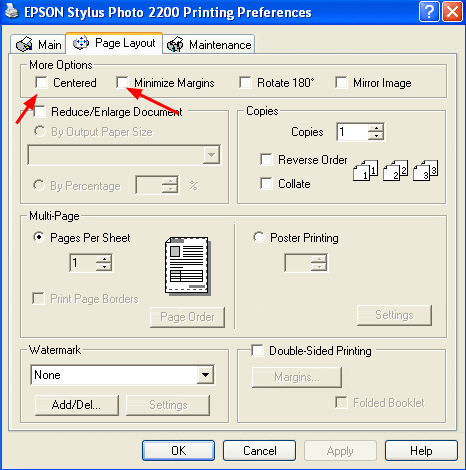
Back at your printer properties dialog
box, click on the Page Layout tab.
Click the CENTERED and MINIMIZE MARGINS
boxes.
Epson printers tend to want to force an
1/2" margin at the end of the print. This interferes with
some card setups using larger images.
Click the OK
button until you are back to this screen.
Notice that paper size is set to Custom.
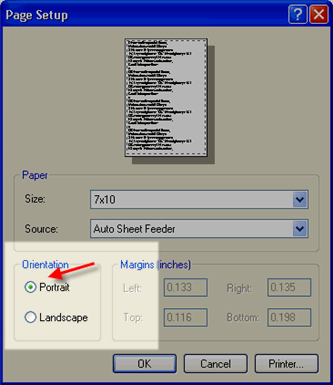
Orientation - For the traditonal open card
of any size, make sure orientation is set to PORTRAIT. If not, you
will notice that the Print with Preview will look wrong. If so, click
Page Setup again and fix the orientation.
Now click OK
STEP 5 - PRINTING
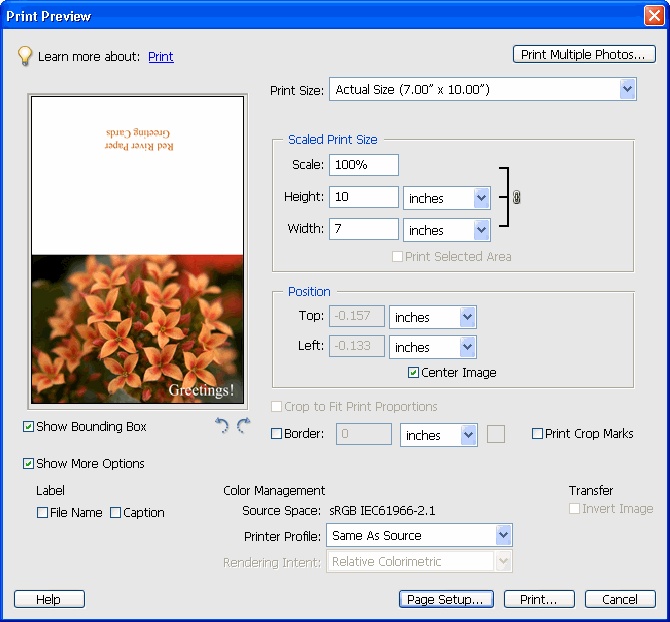
Notice that the preview screen looks like
the printed card should - the excessive white space is gone.
You can now click print and proceed as normal.
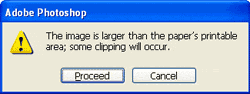
You may see this warning - if so simply click proceed.
I'm an amateur photographer. I like taking my own pictures, edit them and then send them out to be printed. I came across an add for Red River Paper. And they offered metallic paper. I never seen it advertised anywhere. So I ordered some tried it out on my Canon printers and they turned out beautiful! Now I'm going to order samples of their other papers to try.
Papers with the Archival designtation can take many forms. They can be glossy, matte, canvas, or an artistic product. These papers are acid free, lignin free and can be made of virgin tree fiber (alpha cellulose) or 25-100% cotton rag. They are likely to have optical or fluorescent brightening agents (OBAs) - chemicals that make the paper appear brighter white. Presence of OBAs does not indicate your image will fade faster. It does predict a slow change in the white point of your paper, especially if it is displayed without UV filter glass or acrylic.
Archival Grade Summary
Numerous papers - made from tree or cotton content
Acid and lignin free base stock
Inkjet coating layer acid free
Can have OBAs in the base or the coating
Museum Grade Paper
Papers with the museum designation make curators happy. They are made from 100% cotton rag content and have no optical brightener content. (OBA) The base stock is acid and lignin free. The coating is acid free. This type of offers the most archival option in terms of media stability over time.
Museum Grade Summary
100% cotton rag content
Acid and lignin free base stock
Inkjet coating layer acid free
No OBA content
Photographic Grade Paper
Photo Grade products are designed to look and feel like modern photo lab paper. Most photo grade media are resin coated, which means they have a paper core covered by a thin layer of polyethelene (plastic) . Plastic gives the paper its photo feel, stability (flatness), water resistance, handling resistance, and excellent feed consistency.
Prints on photo grade media are stable over long periods. With pigment inks in a protected environment, you can see up to 80 years on-display life. All RC papers are Photo Grade for two reasons. Plastic content is not technically archival by museum standards. Also, the inkjet coating of all RC papers is slightly acidic. It facilitates instant drying and does not actually change the stability of your inks over time. Virtually all RC papers have optical brightening agents (OBAs).