Greeting Card Setup for Photoshop CS2 CS 7.0 on Windows (Basic)Vertical Image Card
These instructions are based on using Photoshop CS or 7.0.
There are many ways to set up and print a greeting card using Photoshop. This tutorial offers the basics of how to turn an image into a greeting card using Red River Paper's line of pre-scored inkjet papers.
STEP 1 - OPEN AND RESIZE YOUR IMAGE
Start by opening the image you wish to use with your card. Resize the image using the chart below. When you are done with that, move to the next step.
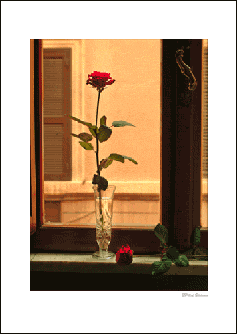
To the right is an image example, opened in Photoshop and resized based on these rules:
Card Size
Max Image Size
7x10
4.75" w x 6.75" h
6.25x9
4.25" w x 6" h
5.5x8.5
4" w x 5.25" h
8x9 Pano
3.75" w x 8.75"
STEP 2 - CANVAS RESIZE PART 1
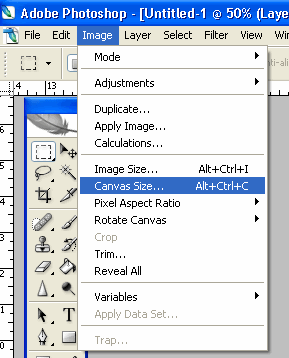
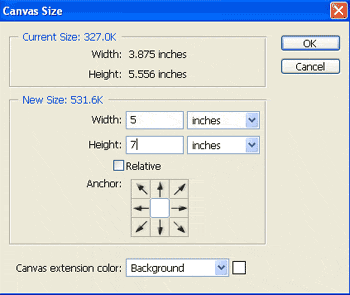
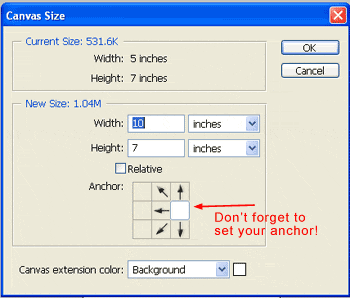
Now, go to the Image menu and select Canvas Size
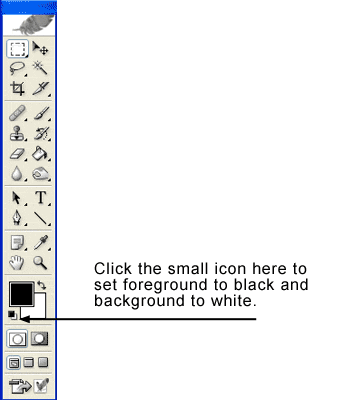
NOTE! Set your background color to white.
In this step, you will establish a border around your image, making the space the same size as your folded card.
Use this table to set your canvas size:
Card Size
Canvas Size
7x10
5" w x 7" h
6.25x9
4.5" w x 6.25" h
5.5x8.5
4.25" w x 5.5" h
8x9 Pano
4" w x 9" h
Click the OK button
Notice how your image now has a white border. The screenshot at left is what the front of your card will look like when folded.
STEP 2 - CANVAS RESIZE PART 2
Go back to the Image menu and choose Canvas Size again. Set width and height according to this chart:
Paper Size
New Canvas Size
7x10
10" w x 7" h
6.25x9
9" w x 6.25" h
5.5x8.5
8.5" w x 5.5" h
8x9 Pano
8" w x 9" h
IMPORTANT! Look at the Anchor boxes right below the canvas size. This tool anchors your current canvas to a particular side of the new canvas. For the landscape card layout, always click the middle right box.
Click OK
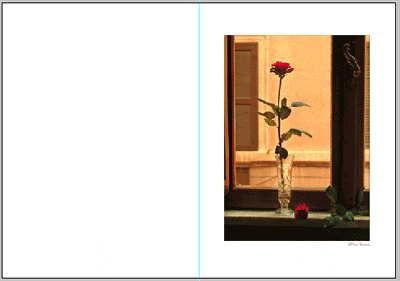
Your new canvas will look like this:
The screenshot at left now looks like the outside of your card before it is folded.
The blue line is a photoshop guide that shows where the fold will be.
If you wish, you can add text to either side of the card using the text tool. For more detailed customization, see our advanced card tutorial.
Top quality and the delivery and packaging is impressive.
I often recommend RR papers to my other fellow artist's looking for good value and superior quality! I'm preparing for a show and am trying the pano card stock. We'll see how the market likes the pano card.
Thanks for you consistent quality customer service RR!
Papers with the Archival designtation can take many forms. They can be glossy, matte, canvas, or an artistic product. These papers are acid free, lignin free and can be made of virgin tree fiber (alpha cellulose) or 25-100% cotton rag. They are likely to have optical or fluorescent brightening agents (OBAs) - chemicals that make the paper appear brighter white. Presence of OBAs does not indicate your image will fade faster. It does predict a slow change in the white point of your paper, especially if it is displayed without UV filter glass or acrylic.
Archival Grade Summary
Numerous papers - made from tree or cotton content
Acid and lignin free base stock
Inkjet coating layer acid free
Can have OBAs in the base or the coating
Museum Grade Paper
Papers with the museum designation make curators happy. They are made from 100% cotton rag content and have no optical brightener content. (OBA) The base stock is acid and lignin free. The coating is acid free. This type of offers the most archival option in terms of media stability over time.
Museum Grade Summary
100% cotton rag content
Acid and lignin free base stock
Inkjet coating layer acid free
No OBA content
Photographic Grade Paper
Photo Grade products are designed to look and feel like modern photo lab paper. Most photo grade media are resin coated, which means they have a paper core covered by a thin layer of polyethelene (plastic) . Plastic gives the paper its photo feel, stability (flatness), water resistance, handling resistance, and excellent feed consistency.
Prints on photo grade media are stable over long periods. With pigment inks in a protected environment, you can see up to 80 years on-display life. All RC papers are Photo Grade for two reasons. Plastic content is not technically archival by museum standards. Also, the inkjet coating of all RC papers is slightly acidic. It facilitates instant drying and does not actually change the stability of your inks over time. Virtually all RC papers have optical brightening agents (OBAs).