You spent time getting the perfect shot, printed it beautifully, framed it with care, and then a few weeks later, you notice a strange, hazy film on the inside of the glass. Maybe it even looks like a ghost image of the photo itself. What is going on?
Don’t panic. Your print is not ruined. This is a well-known phenomenon in the inkjet printing world called gas ghosting (sometimes called out-gassing), and the good news is it’s completely preventable and fixable if it’s already happened.
What Is Gas Ghosting?
Gas ghosting is a foggy film or faint ghost image that appears on the inside surface of glass in a framed inkjet print. It’s caused by ink solvents that haven’t fully cured before the print was sealed behind glass.
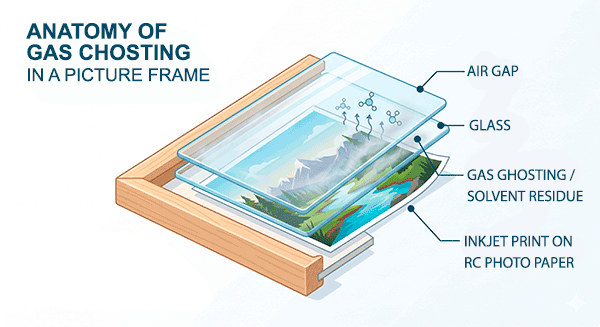
Here’s the thing most people don’t realize: a print that feels dry to the touch isn’t necessarily fully cured. The water in inkjet ink evaporates quickly - usually within about 15 minutes of printing. But the solvents in the ink take considerably longer to fully dissipate. When you frame a print before those solvents have had time to escape, they have nowhere to go. They off-gas inside the frame and deposit a residue on the glass. That residue is what you’re seeing.
Which Papers Are Most Affected?
Most Likely: Barrier papers - like RC (resin-coated) photo papers - are the most susceptible to gas ghosting. RC papers have a coating that prevents ink from being absorbed deeply into the paper base. That’s actually what makes them look so gorgeous: bright, vivid, glossy. But that same barrier also traps solvents near the surface, reducing their escape routes.
Least Likely: Matte, fine art, watercolor, and cotton rag papers naturally absorb residual solvents into their fiber structure, so gas ghosting is rarely an issue with these paper types.
So, if you’re printing on glossy or semi-gloss RC papers and planning to frame under glass, this topic is especially relevant to you.
Does This Mean Something Is Wrong With My Ink or Printer?
No - This is a common misconception. Gas ghosting is not a defect. It’s not specific to any one ink brand or printer manufacturer. Pigment inks, dye inks, Epson, Canon, HP, it can happen with all of them on barrier-type papers. It’s simply a characteristic of how inkjet inks cure, and it only becomes a problem when prints are framed too soon.
It also has nothing to do with the long-term durability or longevity of your prints. Your image is fine. Only the glass gets fogged.
How to Prevent Gas Ghosting: The Simple Drying Process
Prevention is easy once you know the trick. Just build a little extra drying time into your workflow before you frame.
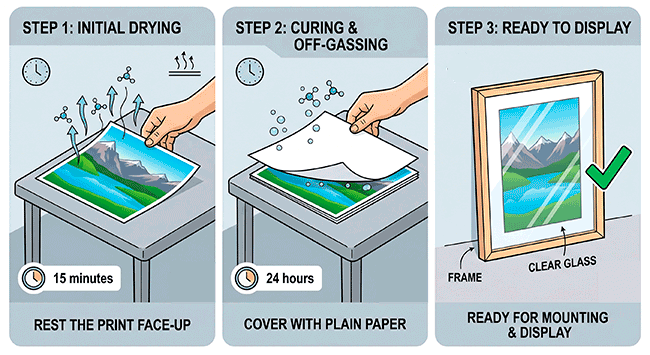
Here’s what to do:
- After printing, let your print rest for 15 minutes. This gives the water in the ink time to fully evaporate.
- Place a sheet of plain, uncoated paper on top of the print and leave it for 24 hours. Regular copy paper works great here — it acts like a sponge, drawing out residual solvents and accelerating the curing process. If you’re printing multiple images, stack them with a sheet of plain paper between each one.
- Check the plain paper after 24 hours. If it feels wavy or wrinkled, that’s actually a good sign — it means it absorbed solvents from your print. Swap it out for a fresh sheet and repeat for another 24 hours. If the paper comes out flat and smooth, your print is cured and ready to frame.
Important: Don’t use coated paper for this process. Coated papers won’t absorb the solvents effectively. Plain, inexpensive copy paper is exactly what you want.
Already Have Ghosting? Here’s the Fix
If you’re reading this because you’ve already got a foggy frame, here’s the easy fix:
- Take the frame apart and remove the glass.
- Clean the glass with a standard glass cleaner - it wipes right off, and the glass is perfectly reusable.
- Follow the plain-paper drying process above for 24–48 hours to fully cure your print.
- Reassemble the frame. Done.
No need to reprint. No need to laminate or seal your print. Just a little patience and some copy paper.
A Note on Laminating
Some people wonder if laminating or sealing a print will prevent gas ghosting. You can absolutely laminate your prints, but it’s not a solution to this problem on its own. You should still follow the drying process first before laminating. Skipping it and laminating straight away can actually trap solvents in, which defeats the purpose.
Quick Reference: Gas Ghosting at a Glance
| Topic | Details |
|---|---|
| What it is | Foggy film on inside of frame glass |
| Cause | Ink solvents curing inside a sealed frame |
| Papers affected | RC / barrier papers |
| Papers not affected | Matte, fine art, cotton rag |
| Does it damage the print? | No |
| Prevention | Plain paper drying process (~ 24 hrs) |
| Fix | Clean glass, cure print, reframe |
Summary
Gas ghosting sounds scarier than it is. Once you understand what’s causing it, it’s easy to prevent with a simple step in your framing workflow. Give your prints the time they need to fully cure, use plain paper to accelerate the process, and your framed prints will look crystal clear for years to come.
If you’re shopping for papers and want to explore your options, whether barrier RC papers for that brilliant glossy look or fine art papers that sidestep this issue entirely. Red River Paper has a wide range of inkjet papers with helpful specs so you can pick the right paper for the right job.
Related Posts and Information
Last updated: May 07, 2026


