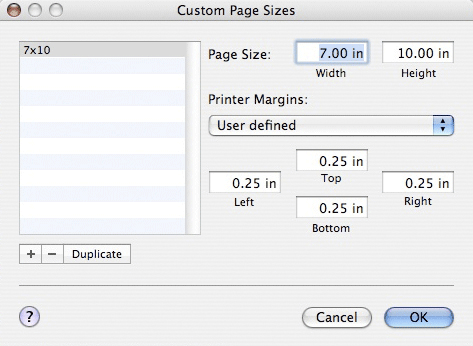
Setting up custom paper sizes (user defined paper sizes) on your Mac can present some challenges.
The custom size needs to be set up carefully to avoid potential problems with print failure.
Width and Height
Always set the width to the smallest dimension of your paper. The height will always be the longer dimension.
Printer Margins
To start, make the custom paper size with 0.25" margins on all four sides and make a test print. If the image is pushed in one direction, make a modification to your margins in the paper setup. Also make sure that your image is indeed centered on the canvas in Photoshop before making changes. Do note that you may need to tweak the margins in the custom paper setup for your particular printer.
The minimum margin size you should try is 0.15". Setting a lower number may result is in a printer error.
Please note you cannot print borderless with custom paper sizes.
An example of the Custom Page dialog box. Note the Printer Margins drop-down menu. Some customers report that leaving it set to Printer Defined is OK. Others state the need to set custom margins like you see above. Start with this method and experiment as noted above.
Related Posts and Information
Last updated: October 19, 2025
WHAT CUSTOMERS SAY ABOUT US
The best ever
Red River is the only place I buy my Photo paper. I Love the quality of my prints and their customer service.
Papers with the Archival designtation can take many forms. They can be glossy, matte, canvas, or an artistic product. These papers are acid free, lignin free and can be made of virgin tree fiber (alpha cellulose) or 25-100% cotton rag. They are likely to have optical or fluorescent brightening agents (OBAs) - chemicals that make the paper appear brighter white. Presence of OBAs does not indicate your image will fade faster. It does predict a slow change in the white point of your paper, especially if it is displayed without UV filter glass or acrylic.
Archival Grade Summary
Numerous papers - made from tree or cotton content
Acid and lignin free base stock
Inkjet coating layer acid free
Can have OBAs in the base or the coating
Museum Grade Paper
Papers with the museum designation make curators happy. They are made from 100% cotton rag content and have no optical brightener content. (OBA) The base stock is acid and lignin free. The coating is acid free. This type of offers the most archival option in terms of media stability over time.
Museum Grade Summary
100% cotton rag content
Acid and lignin free base stock
Inkjet coating layer acid free
No OBA content
Photographic Grade Paper
Photo Grade products are designed to look and feel like modern photo lab paper. Most photo grade media are resin coated, which means they have a paper core covered by a thin layer of polyethelene (plastic) . Plastic gives the paper its photo feel, stability (flatness), water resistance, handling resistance, and excellent feed consistency.
Prints on photo grade media are stable over long periods. With pigment inks in a protected environment, you can see up to 80 years on-display life. All RC papers are Photo Grade for two reasons. Plastic content is not technically archival by museum standards. Also, the inkjet coating of all RC papers is slightly acidic. It facilitates instant drying and does not actually change the stability of your inks over time. Virtually all RC papers have optical brightening agents (OBAs).