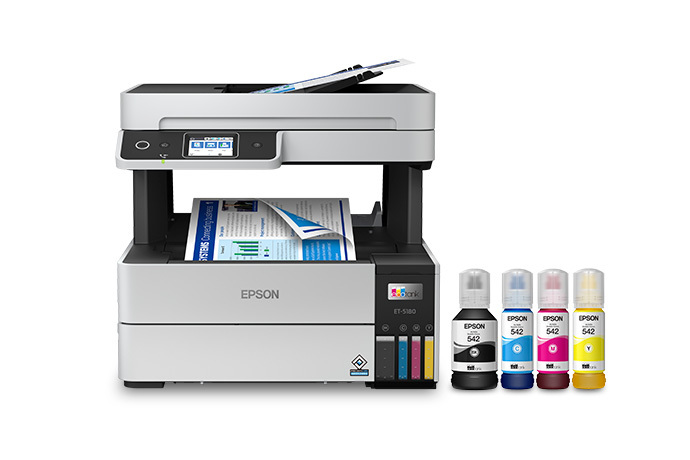
Red River Paper supports the Epson EcoTank series printers that use Epson 542 inks, including the following models:
- ET-5150
- ET-5170
- ET-5180
- ET-5800
- ET-5850
- ET-5880
- ET-16600
- ET-16650
Using ICC color correction profiles with your EcoTank printer is not required, however using our profiles will yield better color accuracy and greater saturation compared to using only the built-in automatic color management.
Red River Paper fully supports Epson printers with profiles and a full range of Fine Art Inkjet Papers and Photo Paper.
Profile Installation and Usage
How to Install Profiles - Windows
How to Install Profiles - Mac
How to Use Profiles
More Profile Support
Profiles Download
Click to Download All Epson EcoTank 542 Ink Profiles
Compatible Media
Due to manufacturing tolerances, difference between models, and differences in local climate, each individual printer may behave slightly differently. Therefore we highly recommend ordering samples of any paper you intend to use with this printer so that you can test out the paper with your specific printer before committing to a whole box of anything.
We recommend using the top/rear feed one sheet at a time rather than the cassette - though you may have luck using the cassette especially with lighter weight papers. Experiment and see what works best for your particular printer and the volume of printing you are doing.
Its also worth saying that the information below are guidelines based on our testing of this printer to help you get started quickly. Absolutely do experiment on your own. Read the manual for your printer. Play with different settings and try different feed paths, have fun learning your printer and see what works best for you.
| Red River Media | Media Type Setting | Notes and Tips |
|---|---|---|
| Adhesive Glossy Sticker Paper | Premium Photo Paper Glossy | May curl upwards after printing. |
| Adhesive Matte Sticker Paper | Premium Presentation Paper Matte | May curl slightly after printing |
| Arctic Polar Luster | Premium Photo Paper Semi-Gloss | Use top paper feed for best results |
| Aurora Art Natural 250 | Premium Presentation Paper Matte | |
| Aurora Art Natural 300 | NOT COMPATIBLE | Jams in the printer |
| Aurora Art White 250 | Premium Presentation Paper Matte | |
| Aurora Art White 300 | NOT COMPATIBLE | Jams in the printer |
| Big Bend Baryta | Ultra Premium Photo Paper Glossy | NOT RECOMMENDED - this printer leaves roller marks on this paper |
| Color Jet | Premium Presentation Paper Matte | |
|
Hanji Baram Hanji Noori |
Presentation Paper Matte | If pages have a lot of curl on the edges, turn on "Thick Paper" setting |
| Palo Duro Baryta Fiber | Premium Photo Paper Semi-Gloss | |
| Palo Duro Etching | NOT COMPATIBLE | Jams the printer |
| Palo Duro Satin | Premium Photo Paper Semi-Gloss | |
| Palo Duro Softgloss Rag | UltraPremium Photo Paper Glossy | NOT RECOMMENDED - this printer leaves roller marks on this paper |
| Paper Canvas | Premium Presentation Paper Matte | |
| Pecos River Gloss 155 (42lb) | Ultra Premium Photo Paper Glossy | May notice light "pizza wheel" marks on surface. Use "Standard" print quality only. |
| Pecos River Gloss 230 (60lb) | Ultra Premium Photo Paper Glossy | May notice light "pizza wheel" marks on surface. Use "Standard" print quality only. |
|
Pecos River Gloss 320 (86lb) Pecos River Gloss 360 (96lb) |
NOT COMPATBILE | Jams in the printer |
| Polar Matte 230 (60lb) | Premium Presentation Paper Matte | |
| Polar Matte 330 (88lb) | Premium Presentation Paper Matte | Turn on "Thick Paper" setting |
| Polar Metallic Gloss | Ultra Premium Photo Paper Glossy | Brush with an anti-static brush before printing to help prevent flecking. |
| Polar Metallic Luster | Premium Photo Paper Semi-Gloss | Brush with an anti-static brush before printing to help prevent flecking. |
|
Premium Matte 120 (32lb) Premium Matte 176 (47lb) |
Premium Presentation Paper Matte | |
|
Premium Matte 185 (50lb) Premium Matte 230 (60lb) |
Premium Presentation Paper Matte | |
| River Linen | Premium Presentation Paper Matte | |
| Transparent Film | NOT COMPATIBLE | Comes out blank |
| Trinity River Velvet | NOT COMPATIBLE | Jams in the printer |
| UltraPro Gloss | Ultra Premium Photo Paper Glossy | |
| UltraPro Luster | Ultra Premium Photo Paper Glossy | |
| UltraPro Satin | Premium Photo Paper Semi-Gloss | |
| UltraPro SemiGloss Duo | Premium Photo Paper Semi-Gloss | NOT RECOMMENDED - ink will not fully dry, will smear if touched |
Troubleshooting
We know all too well how frustrating printers can be sometimes! Here are some steps to take if you find yourself running into issues printing on your Epson printer using our media.
With any printer, the Epson EcoTank series included, the first troubleshooting step if you are running into issues with color, centering/margins, paper jamming, missing media types, or other technical problems, is to ensure you have the latest official Epson printer driver installed.
You can download the official Epson driver from the Epson website
On Mac OS, doing a system update can cause the official Epson driver to be silently replaced by Apple's generic printer driver that they call "AirPrint". You can find instructions on how to find your driver version and install the correct one here: https://www.redrivercatalog.com/infocenter/how-to-fix-missin...
Often on Mac OS, even if you have the correct driver installed, removing the printer, updating the driver, and re-adding the printer and then rebooting the computer will fix the issue.
On Windows, if you connect the printer to the computer without having installed the Epson driver, it will use Microsoft's generic printer driver that they call "IPP". To correct the issue, simply download and install the latest driver from Epson's website and it will replace the generic printer driver with the correct one.
Most common issues are addressed in our Infocenter and our Frequently Asked Questions page.
You can also contact us with technical support questions through this page: https://www.redrivercatalog.com/contact-us.html
Related Posts and Information
Last updated: June 27, 2025


