Photoshop CS3 Greeting Card Setup Tutorial - Horizontal PC
There are many ways to set up and print a greeting card using Photoshop. This tutorial offers a "Photoshop as a layout tool" approach to greeting card printing. If you think of the canvas you will make as the unfolded card (outside or inside), then learning where to place images, text, borders, etc. will be very easy.
Note that there will always be a small white border around on the outside edges of Red River Paper greeting cards . Borderless greeting cards are possible in only certain instances. You must use a 7x10 card and have a 13" wide printer. Special help for that is here
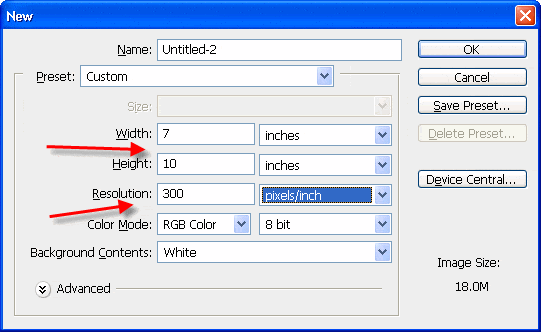
Start with a blank canvas. Choose File > New from the top menu.
1) Make a new canvas based on these size rules:
Paper Size
New Canvas Size
7x10
10" h x 7" w
6.25x9
9" h x 6.25" w
5.5x8.5
8.5" h x 5.5" w
2) Set resolution to 300ppi
STEP 1 - CREATE A BLANK CANVAS
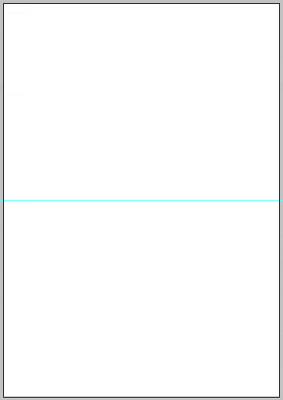
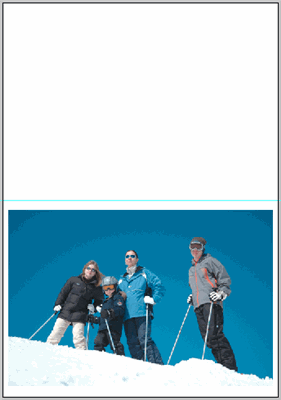
Your blank canvas for horizontal photo orientation will look like this.
The blue guide visible in the middle is where the pre-scored fold line is on each sheet of paper.
The lower half of the page will be the outside front of the card. The top half is the outside back.
STEP 2 - CARD LAYOUT
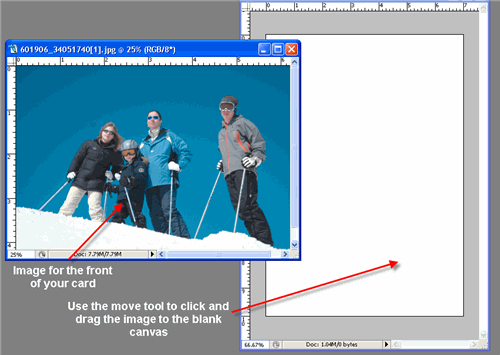
Next, open the image(s) that you want on the front of your card. You can prepare images beforehand with borders or other special effect. Or, you can open a simple unaltered image for placement on the card.
Make sure you crop or otherwise size your image to the dimensions at right.
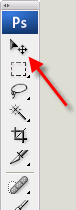
Now, use the Move tool and drag images onto the blank canvas you created in the step above. They will come into the blank document as new layers.
Move Tool
NOTE! These cards have a maximum image area that can go on each side without any cropping. Check this chart for the rules:
Card Size
Max Image Area
7x10
4.75" h x 6.75" w
6.25x9
4.25" h x 6" w
5.5x8.5
4" h x 5.25" w
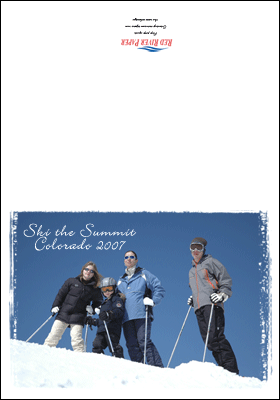
The bottom is the outside front of your card while the blank area is the outside back.
The blue guide line in the middle represents where your card will fold.
To make more customizations, drag more images onto the canvas or add text and borders like the example at left.
NOTE! All text and image on the outside back of the card MUST be UPSIDE DOWN in your layout to print correctly. Click for help with this subject
The minimum margin is no less than a 1/8" border on all sides of the card.
I ordered 1 box of the gloss 45# paper not expecting the high quality that I would be receiving for that price. It prints amazing results. I got it just in time for my great grandson's birth on Friday, WOW. It was a C-section and my daughter caught a great photo of the baby being removed from my granddaughter's belly, a once in a life time photo and I printed copies on your paper, I just ordered 2 more boxes. Great shipping and high value products. I am sold on Red River.
Papers with the Archival designtation can take many forms. They can be glossy, matte, canvas, or an artistic product. These papers are acid free, lignin free and can be made of virgin tree fiber (alpha cellulose) or 25-100% cotton rag. They are likely to have optical or fluorescent brightening agents (OBAs) - chemicals that make the paper appear brighter white. Presence of OBAs does not indicate your image will fade faster. It does predict a slow change in the white point of your paper, especially if it is displayed without UV filter glass or acrylic.
Archival Grade Summary
Numerous papers - made from tree or cotton content
Acid and lignin free base stock
Inkjet coating layer acid free
Can have OBAs in the base or the coating
Museum Grade Paper
Papers with the museum designation make curators happy. They are made from 100% cotton rag content and have no optical brightener content. (OBA) The base stock is acid and lignin free. The coating is acid free. This type of offers the most archival option in terms of media stability over time.
Museum Grade Summary
100% cotton rag content
Acid and lignin free base stock
Inkjet coating layer acid free
No OBA content
Photographic Grade Paper
Photo Grade products are designed to look and feel like modern photo lab paper. Most photo grade media are resin coated, which means they have a paper core covered by a thin layer of polyethelene (plastic) . Plastic gives the paper its photo feel, stability (flatness), water resistance, handling resistance, and excellent feed consistency.
Prints on photo grade media are stable over long periods. With pigment inks in a protected environment, you can see up to 80 years on-display life. All RC papers are Photo Grade for two reasons. Plastic content is not technically archival by museum standards. Also, the inkjet coating of all RC papers is slightly acidic. It facilitates instant drying and does not actually change the stability of your inks over time. Virtually all RC papers have optical brightening agents (OBAs).