Quick Tip: Get Your Adobe Creative Cloud Receipts Quickly

Creative Cloud logo © Adobe Inc.
At Red River Paper, we have at least four Creative Cloud accounts at any given time. Since it is a subscription service, we are charged monthly or, in some cases, yearly. The accounting department requires receipts for proper recordkeeping.
This is where the problem starts. Adobe does not send a monthly email receipt to remind you of your purchase. Instead, you have to log into their site and navigate through several pages to locate and print a receipt.
If you want to quickly access your receipt in two steps, here is how:
1. Log into your account at www.adobe.com.
2. Go to https://anyware.adobe.com/billing/billingList.htm, which will display a list of your recent receipts.
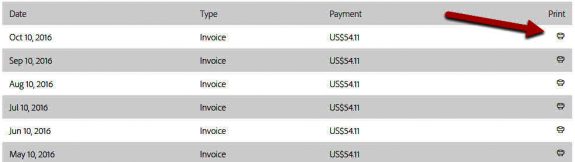
You can print any receipt by clicking the “Print” icon on the right side of the page.
You can now save the URL above as a bookmark in your browser and return to it each month, after logging into your account, whenever you need to view or print a receipt.
Original Publication Date: May 01, 2026
Article Last updated: May 01, 2026
Related Posts and Information
Categories
About Photographers
Announcements
Back to Basics
Books and Videos
Cards and Calendars
Commentary
Contests
Displaying Images
Editing for Print
Events
Favorite Photo Locations
Featured Software
Free Stuff
Handy Hardware
How-To-Do-It
Imaging
Inks and Papers
Marketing Images
Monitors
Odds and Ends
Photo Gear and Services
Photo History
Photography
Printer Reviews
Printing
Printing Project Ideas
Red River Paper
Red River Paper Pro
RRP Products
Scanners and Scanning
Success on Paper
Techniques
Techniques
Tips and Tricks
Webinars
Words from the Web
Workshops and Exhibits
all
Archives
August, 2026
July, 2026
June, 2026
May, 2026
April, 2026
March, 2026
February, 2026
January, 2026
November, 2025
more archive dates
archive article list


Red River Paper Inc. All contents © 1997 - 2026. 8900 Ambassador Row, Dallas Texas, 75247. Prices, specifications, and images are subject to change without notice. Not responsible for typographical or illustrative errors. Website Terms & Conditions | Acceptable Use
Site Development & Maintenance: Phosphor Media, LLC