Laurie Excell’s Tech Tuesday Photography Tips – Red River Paper
Red River Paper presents Laurie Excell’s Tech Tuesday post.
Tech Tuesday: Slow Motion Blurs
I live in the perfect location to photograph one of my favorite subjects: moving water. With waterfalls, rivers, streams, and the Oregon Coast nearby, I am in water photography paradise.

Not only do we have lots of moving water, but we also have plenty of overcast days. While that is not something most people brag about, it is ideal here because it provides softer light and allows me to achieve slower shutter speeds than I could in bright sunlight.
Even with overcast conditions, achieving the perfect balance of aperture, shutter speed, and ISO can be challenging when trying to render motion with just the right amount of blur. The desired effect ultimately comes down to personal preference.
Finding the right shutter speed for your subject’s movement is key to capturing the look and feel you want. Available light, your lens’s aperture range, and your camera’s ISO settings all influence the shutter speeds you can achieve in any given situation.
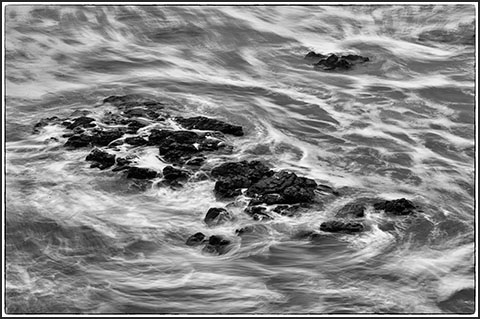
There are times when you have already selected the lowest ISO and smallest aperture, yet still cannot achieve a slow enough shutter speed. In those cases, additional tools are needed to push beyond your camera’s normal limitations.

Tech Specs
Mid-morning, partly cloudy sky with light moving across the waves.
Camera and lens mounted on a sturdy tripod with a remote release and interval timer attached.
Compose the scene carefully.
Set focus using autofocus, then switch to manual focus.
Take a test shot and review the histogram or highlight warnings to establish a base exposure.
Adjust ISO and aperture to find the shutter speed that produces the desired blur.
Once the ideal settings are found, capture multiple images, as motion blur often produces unique variations.
For shutter speeds within 30 seconds, use aperture priority mode. For exposures longer than 30 seconds, switch to manual mode and use a remote release to extend exposure times into minutes or longer.
If there is too much light, use a polarizing filter to reduce exposure by up to two stops, or a neutral density filter to reduce light further, typically between one and ten stops.
After establishing a base exposure, adjust settings to achieve slower shutter speeds. For example, an initial reading at ISO 100 and f/38 produced a shutter speed of 1/15 second, which was too fast. Adding a 10-stop ND filter reduced the shutter speed to one minute. Lowering ISO further allowed for a final exposure of two minutes.
Set the camera to manual mode, switch to bulb exposure, and use the remote to control timing. Once the desired result is achieved, use interval shooting to capture multiple exposures while observing the scene.
Note: These motion blur techniques can be applied to any moving subject.
Equipment
Nikon D4 with AF-S 28–300mm f/3.5–5.6 G VR lens
Nikon MC-36 remote release with interval timer
Gitzo GT3531 carbon fiber tripod with Really Right Stuff BH-55 ball head
Hoya 77mm ND400X 10-stop neutral density filter
Original Publication Date: February 19, 2013
Article Last updated: May 01, 2026
Related Posts and Information
Categories
About Photographers
Announcements
Back to Basics
Books and Videos
Cards and Calendars
Commentary
Contests
Displaying Images
Editing for Print
Events
Favorite Photo Locations
Featured Software
Free Stuff
Handy Hardware
How-To-Do-It
Imaging
Inks and Papers
Marketing Images
Monitors
Odds and Ends
Photo Gear and Services
Photo History
Photography
Printer Reviews
Printing
Printing Project Ideas
Red River Paper
Red River Paper Pro
RRP Products
Scanners and Scanning
Success on Paper
Techniques
Techniques
Tips and Tricks
Webinars
Words from the Web
Workshops and Exhibits
all
Archives
September, 2026
August, 2026
July, 2026
June, 2026
May, 2026
April, 2026
March, 2026
February, 2026
January, 2026
more archive dates
archive article list


Red River Paper Inc. All contents © 1997 - 2026. 8900 Ambassador Row, Dallas Texas, 75247. Prices, specifications, and images are subject to change without notice. Not responsible for typographical or illustrative errors. Website Terms & Conditions | Acceptable Use
Site Development & Maintenance: Phosphor Media, LLC