Printing Proxies at Home
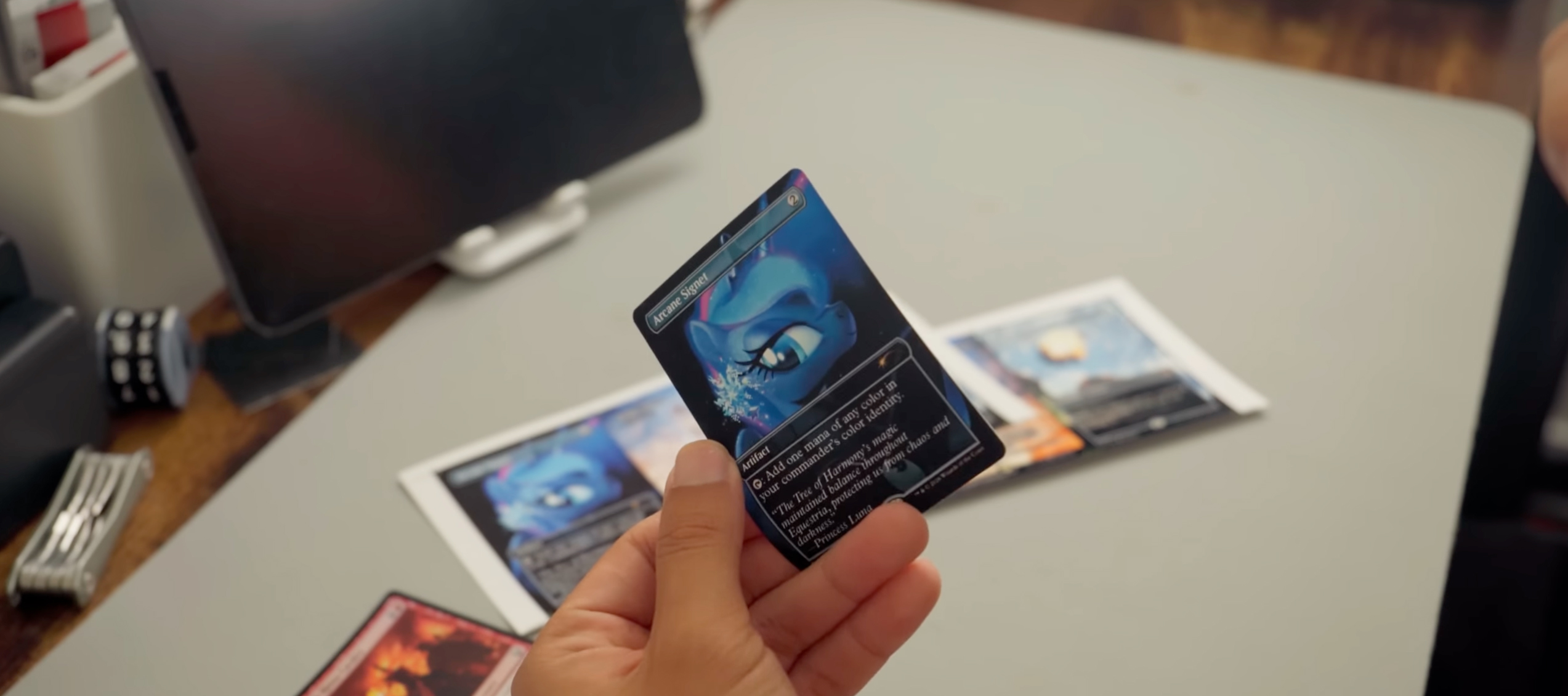
Image Credit: CryCry
Whether you're testing a new deck, creating custom game cards, or building a cube without investing in expensive singles, printing your own proxy cards can be a fun and affordable solution. The difference between a proxy that looks homemade and one that looks professionally produced often comes down to three things: paper selection, printer settings, and finishing techniques.
Fortunately, you don't need specialized equipment to create impressive results. With a quality inkjet printer, the right paper, and a few simple tools, you can produce sharp, vibrant proxy cards that look great on the table and hold up during casual play.
In this guide, you'll learn how to choose the best paper for proxy cards, configure your printer for optimal results, and create cards that look and feel significantly better than standard printouts.
What Are Proxy Cards?
Proxy cards are unofficial reproductions of trading cards used for playtesting, casual gaming, cube drafting, or custom card projects. While they're commonly associated with collectible card games, proxy cards can be created for virtually any tabletop game that uses card-based mechanics.
Why Players Use Proxy Cards
Many players print proxies to test new deck ideas before purchasing cards. Others use proxies for casual playgroups, custom formats, or to replace rare and expensive cards that they prefer not to handle regularly.
Proxy cards are also popular among designers who create custom game mechanics, alternate artwork, or fan-made expansions.
Are Proxy Cards Legal for Tournament Play?
Most organized tournaments require authentic cards. Proxy cards are generally intended for casual use, testing, and personal projects. Always check the rules of your local game store, event organizer, or tournament before bringing proxy cards to an event.
What You Need to Print Professional-Looking Proxy Cards
Creating high-quality proxy cards doesn't require commercial printing equipment, but a few essentials will dramatically improve your results.
Printer Requirements
An inkjet printer is usually the best choice for proxy cards because it produces rich colors, smooth gradients, and excellent image detail. Most modern photo printers can easily handle the resolution required for trading card artwork.
Laser printers can also produce good results, particularly for text-heavy cards, but many players prefer the color reproduction of inkjet printers.
For the best results, use high-quality print settings and source images with a resolution of at least 300 PPI.
Paper and Cardstock Options
The paper you choose will have a greater impact on the finished card than almost any other factor. Thin copy paper may work for simple sleeve inserts, but premium photo papers and cardstocks deliver better color saturation, sharper text, and a more professional appearance.
Choosing the Best Paper for Printing Proxy Cards
Not all papers are created equal. Different projects require different surfaces, weights, and finishes.
Standard Printer Paper
Regular office paper is inexpensive and easy to print on, making it popular for quick deck testing.
Pros:
- Affordable
- Easy to find
- Works with nearly any printer
Cons:
- Reduced sharpness
- Less vibrant colors
- Less durable
Most players using standard paper place the printed card in a sleeve with a basic land or common card behind it.
Matte Photo Paper
For many hobbyists, matte photo paper offers the best balance of image quality, readability, and realism.
Benefits include:
- Rich color reproduction
- Sharp text and artwork
- Reduced glare
Matte papers are often preferred because they closely resemble professionally printed game cards.
For proxies, we recommend our Polar Matte 330. See it in action below or visit the CryCry Channel on Youtube.
Gloss Photo Paper
Gloss papers produce vibrant colors and strong contrast.
Advantages:
- Exceptional color depth
- Crisp image detail
- Premium visual appearance
Potential drawbacks:
- Increased glare under bright lighting
- Potential fingerprints with repetitive handling
Gloss papers often work best for display cards, collector projects, and custom artwork.
Heavyweight Cardstock
Cardstock allows you to create standalone cards without sleeves or backing. SPECIAL NOTE: Make sure you choose cardstock that is inkjet paper. A plain, uncoated stock can work, but color saturation and sharpness will be of lesser quality compared to a paper specifically intended for inkjet use.
Benefits include:
- Greater durability
- Premium feel
- Better handling
Cardstock weight is often in the 60-100 lb range. Red River Paper lists weight in GSM (grams per square meter). Cardstock range is 270-360gsm.
Double-Sided Papers
Double-sided papers are ideal for custom card games, fan-made expansions, and projects that require artwork on both sides of the card. These papers eliminate the need to glue or mount separate printed sheets.
Best Red River Paper Options for Proxy Cards
Several Red River Paper products are particularly well suited for proxy printing.
Polar Matte
Polar Matte is an excellent choice for players seeking vivid colors, clear text, and a glare-free finish. It produces sharp detail while maintaining a professional appearance during gameplay.
Polar Matte is available in three options:
- Polar Matte 230 - 10 mil thick and "photo weight"
- Polar Matte 230 Double-sided - Print photo and art quality on both sides, 11 mil thick and "photo weight"
- Polar Matte 330 - 15 mil thick and "cardstock" weight
Not all printers will handle Polar Matte 330. Check the printer recommendation specs or contact us to verify.
Palo Duro SoftGloss Rag
For premium projects, Palo Duro SoftGloss Rag delivers exceptional color depth and a luxurious surface texture. It is particularly well suited for showcase cards, custom artwork, and collector-quality projects.
Heavyweight Cardstock Options
For standalone cards, heavyweight cardstocks offer increased rigidity and durability while maintaining excellent print quality.
| Paper Type | Finish | Best Use |
|---|---|---|
|
Polar Matte 230 |
Matte |
Everyday proxy cards |
|
Palo Duro SoftGloss Rag |
Soft Gloss |
Premium proxy projects |
|
Polar Matte 230 Double-sided |
Matte |
Front-and-back card printing |
|
Polar Matte 330 |
Matte |
Standalone cards |
What Cardstock Weight Is Best for Proxy Cards?
One of the most common questions among proxy creators is how thick the paper should be.
Lightweight Papers 120-130gsm (20–32 lb)
Best for:
- Sleeve inserts
- Quick testing
- Budget builds
Medium Cardstocks 230-270gsm (60–80 lb Cover)
Best for:
- Durable proxies
- Frequent gameplay
- High-quality deck testing
Heavy Cardstocks 270-360gsm (100 lb Cover and Above)
Best for:
- Display cards
- Collector projects
- Custom card games
|
Weight Category |
Typical Use |
|
120-130gsm (20–32 lb) |
Sleeve inserts |
|
230-270gsm (60–80 lb Cover) |
Everyday proxies |
|
270-330gsm (100 lb Cover) |
Premium and display cards |
Recommended Printer Settings for Sharp Proxy Cards
Even the best paper cannot compensate for incorrect print settings.
Use High-Resolution Source Images
Low-resolution artwork often appears blurry, pixelated, or soft when printed. Whenever possible, use images designed specifically for print.
Print at High or Photo Quality Setting
Most professional card printing is produced with your print quality set to High, Photo, or a similar setting. This ensures sharp text, clean borders, and detailed artwork.
Disable "Fit to Page"
Many printing issues occur because software automatically scales artwork to fit the page.
Always select:
- Actual Size
- 100% Scale
This helps maintain proper card dimensions.
Print at Actual Size
Trading cards are designed to precise dimensions. Even small scaling errors become noticeable during gameplay.
Select the Correct Media Type
Choose the media type that matches your paper:
- Matte Photo Paper
- Gloss Photo Paper
- Heavyweight Cardstock
This allows your printer to optimize ink placement and color output.
Trading Card Dimensions and Print Layouts
Before printing, verify that your card files match the intended dimensions.
Standard Trading Card Size
Most popular trading card games use:
2.5 inches x 3.5 inches
|
Card Type |
Dimensions |
|
Standard Trading Card |
2.5" x 3.5" |
|
MTG |
2.5" x 3.5" |
|
Pokémon |
2.5" x 3.5" |
If you're creating custom layouts, include bleed areas and safe margins to prevent cutting errors.
How to Make Proxy Cards Feel More Like Real Cards
The printing process is only part of the equation.
Paper Insert and Sleeve Method
This is the most common approach.
Print on paper, cut the card, and place it in a sleeve in front of a basic land or common card.
Benefits:
- Inexpensive
- Fast
- Consistent thickness
Cardstock Printing Method
Printing directly on cardstock creates a more durable standalone card.
Benefits:
- Cleaner appearance
- Improved handling
- Better durability
Sticker Paper on Bulk Cards
Some players print on adhesive paper and apply the image to inexpensive bulk cards.
Benefits:
- Closest feel to authentic cards
- Excellent durability
- Professional appearance
|
Method |
Cost |
Realism |
|
Sleeve Insert |
Low |
Good |
|
Cardstock |
Medium |
Very Good |
|
Sticker Overlay |
Medium |
Excellent |
How to Cut Proxy Cards Cleanly
Even high-quality prints can look unprofessional if they're poorly cut.
Using a Rotary Trimmer
Rotary trimmers provide clean cuts and excellent consistency for larger batches.
Using a Guillotine Cutter
Guillotine cutters are fast and efficient when processing multiple sheets.
Corner Rounders and Finishing Tools
Rounded corners help proxy cards feel more authentic and improve durability during handling.
Common Proxy Printing Mistakes to Avoid
Incorrect Scaling
Always print at 100% scale.
Low-Resolution Artwork
Use images designed for printing whenever possible.
Using Paper That's Too Thick
Not all printers support heavyweight cardstock. Verify compatibility before purchasing.
Printing on the Wrong Side
Many specialty papers have designated printable surfaces.
Ignoring Color Management
Printer profiles and paper-specific settings can significantly improve color accuracy.
Frequently Asked Questions
What is the best paper for printing proxy cards?
Matte photo paper is often considered the best balance of color quality, readability, durability, and reduced glare.
Can you print proxy cards on cardstock?
Yes. Many hobbyists use cardstock to create more durable standalone proxy cards.
What cardstock weight should I use for proxy cards?
Most users find that 60 lb to 80 lb cover stock provides an excellent balance between durability and printer compatibility.
Is matte or gloss better for trading cards?
Matte paper generally produces less glare and is preferred for gameplay. Gloss paper often excels for display purposes.
Can I print proxy cards on a regular inkjet printer?
Absolutely. Modern inkjet printers are capable of producing excellent proxy cards when paired with quality paper and proper settings.
Can I print double-sided proxy cards?
Yes. Double-sided matte papers make it easy to create custom cards with artwork and information on both sides.
Final Thoughts
Creating professional-looking proxy cards at home is easier than ever. With the right combination of paper, printer settings, and finishing techniques, you can produce cards that look dramatically better than standard office-paper printouts.
For most projects, a premium matte photo paper offers the ideal balance of image quality and usability. If you're creating collector-quality cards, custom artwork, or standalone game pieces, heavier cardstocks and premium specialty papers can elevate your results even further.
By choosing the appropriate paper, printing at the correct resolution, and paying attention to sizing and finishing details, you'll create proxy cards that look great, handle well, and enhance your gaming experience.
Original Publication Date: June 29, 2026
Article Last updated: October 08, 2026
Related Posts and Information
Categories
About Photographers
Announcements
Back to Basics
Books and Videos
Cards and Calendars
Commentary
Contests
Displaying Images
Editing for Print
Events
Favorite Photo Locations
Featured Software
Free Stuff
Handy Hardware
How-To-Do-It
Imaging
Inks and Papers
Marketing Images
Monitors
Odds and Ends
Photo Gear and Services
Photo History
Photography
Printer Reviews
Printing
Printing Project Ideas
Red River Paper
Red River Paper Pro
RRP Products
Scanners and Scanning
Success on Paper
Techniques
Techniques
Tips and Tricks
Webinars
Words from the Web
Workshops and Exhibits
all
Archives
September, 2026
August, 2026
July, 2026
June, 2026
May, 2026
April, 2026
March, 2026
February, 2026
January, 2026
more archive dates
archive article list


Red River Paper Inc. All contents © 1997 - 2026. 8900 Ambassador Row, Dallas Texas, 75247. Prices, specifications, and images are subject to change without notice. Not responsible for typographical or illustrative errors. Website Terms & Conditions | Acceptable Use
Site Development & Maintenance: Phosphor Media, LLC